


Go to Windows platform Display platforms icon
Go to Windows platform Go to Mac platform Go to Android platform Go to iOS platform
Bandicam icon

Bandicam

8.3.0.2533
Dev Onboard
4.4 44 reviews
4 M downloads
security security

Record your screen, even while playing video games

Advertisement
Remove ads and more with Turbo
Advertisement
Remove ads and more with Turbo
Andrés López icon
Reviewed by
Andrés López
Content Editor
Andrés López is part of Uptodown's in-house Editorial Team. Translated by Uptodown Localization Team

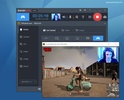
Bandicam is an app that offers you a way to capture everything happening on your PC screen. You can record anything from short videos of your desktop to any program that uses DirectX or OpenGL graphics technology, which is the case for the vast majority of modern video games. The program's configuration options also allow you to modify the quality and size of the video, the type of codec, the number of frames per second, the channels and the audio bitrate, or even if you want the mouse cursor to be visible or not.

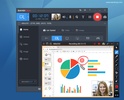
Record video and take screenshots

Although Bandicam is most commonly used to record videos, the program also offers a comfortable way to take screenshots. You can set any keyboard shortcut you like to take a screenshot, add your own logo automatically to each one, and of course choose between several different formats: BMP, PNG and JPG. For JPGs, you can also choose from several different compression ranges.

Advertisement
Remove ads and more with Turbo

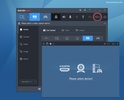
Select the area you want to capture

One of Bandicam's greatest benefits is that it allows you to select exactly where you want to record or capture. The Select Recording Area option allows you to automatically set a rectangle over any window and limit the screen recording to this area. However, you can also set this rectangle manually or enter the exact measurements. And, of course, you can always record the entire screen. If you have several monitors connected, just select which monitor you want to record.

Remove the watermark from Bandicam

There are many memes about the Bandicam logo. And no wonder; the program's watermark automatically appears on all recorded videos when no license key has been entered. You can enter this key in the About tab, under the Registration section. Cracks of Bandicam and keymakers are not recommended, as these programs typically install malware. After all, the software is completely free, so it's not worth the risk just to remove the logo from your recordings.

Edit your videos with Bandicut

The Bandicam interface includes a button with the Bandicut logo. You can automatically download this other program from the same developers by clicking this button, through which you can then edit any video. This software is very easy to use and allows you to trim videos in a matter of seconds. As a result, after recording some gameplay you can quickly trim the video to keep only the highlights.

The best way to record videos and take screenshots

Download Bandicam and discover a very useful tool to help you record videos related to video games or make Windows tutorials. The program is incredibly simple to use, but if you have any doubts about how to do anything, tutorials are available on the developers' official website.

Information about Bandicam 8.3.0.2533

Basic information

Developer Bandicam Company
Category Screen Recorders
Rating All ages
Languages English

Distribution model

Pricing Free
License Owner
Copyright © 2026 Bandicam Company
Why is this app published on Uptodown? (More information)

Security and privacy

Required permissions Not applicable
See security and antivirus report

Download info

Downloads 4,025,660
Date Jan 2, 2026
File type EXE
Size 29.94 MB
SHA256 88fd7fe0e7515ed7c0c99dc81e1cfa02b280f53ecfb6946541e4a930804fbf64
Advertisement
Remove ads and more with Turbo

Older versions

See more
exe 8.2.2.2531 Sep 19, 2025
exe 8.2.1.2530 Sep 3, 2025
exe 8.2.1.2529 Aug 28, 2025
exe 8.2.0.2524 Aug 12, 2025
exe 8.1.1 Mar 31, 2025
exe 8.1.0 Jan 21, 2025

Rate this App

Review the app
Bandicam icon

Rating

4.4
5
4
3
2
1
44 reviews

Comments

See more
hungrygreypartridge57666 icon
hungrygreypartridge57666
in 2024

super duper good

Like
Reply
hungryyellowcactus34368 icon
hungryyellowcactus34368
in 2024

The best program, I am a YouTuber named MEnde. Please subscribe and follow me.

3
1
magnificentsilverbear21647 icon
magnificentsilverbear21647
in 2023

I liked it honestly

2
Reply
kathy_9 icon
kathy_9
in 2022

I Love This Screen Recorder!! I Usually Use The Device Recording Mode In Bandicam To Convert The Vhs Tapes To Mp4 Files. This Works Great!!! Also, I Sometimes Record Myself With Bandicam. It'S Very He...See more

Like
Reply
luatristek icon
luatristek
in 2021

Very good, very useful, it's a bit complicated to use but quite functional. The free option only records 10 minutes, I don't know what the paid program options are, but the free one is very good and h...See more

Like
Reply
devstra icon
devstra
in 2021

Amazing screen recorder

Like
Reply
See more
Advertisement
Remove ads and more with Turbo
TikTok LIVE Studio icon
Stream live more easily and to more people
scrcpy icon
Control your smartphone and tablet from your computer
ManyCam icon
Take your live streams to the next level
Streamlabs Desktop icon
Broadcast online with all the frills
AMCap icon
Simple video capture tool
EaseUS RecExperts icon
Easily capture your PC screen
vMix icon
The best tool for live broadcasting
IceCream Screen Recorder icon
Record videos of the activity on your PC
CapCut icon
Incredibly powerful and easy-to-use video editor
FormatFactory icon
Conversion between video, sound and image formats
HEVC Video Extensions from Device Manufacturer icon
Play HEVC (H.265) encoded videos on Windows
Adobe After Effects icon
The most advanced video-editing tool from Adobe
VLC Media Player icon
A powerful media player and streaming server
Adobe Premiere Pro icon
Video editing for professionals and beginners
IPTV Stream Player icon
Complete IPTV content player for Windows
KMPlayer icon
A multimedia player for everything